
The Setup Behind the Live Signal
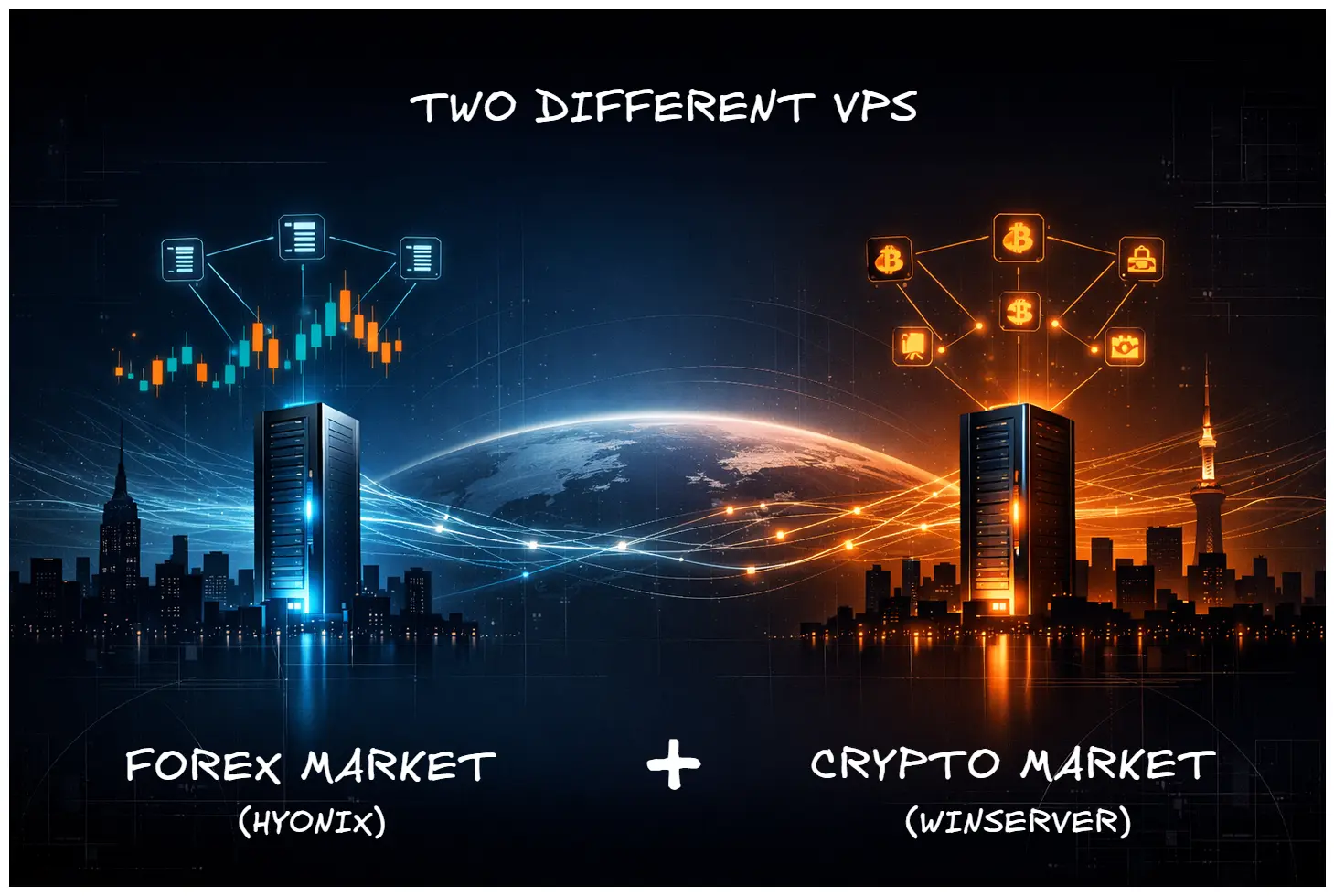
I run a live MT5 EA on USDJPY one-hour bars from a VPS in New York, and three separate crypto futures bots on Binance, Bitget, and Bybit from a different VPS in Tokyo. The total cost of both VPS combined is about eighteen dollars a month. That number surprises most people who hear it because the typical assumption is that running anything serious in trading requires expensive infrastructure. It does not. What it requires is putting each piece in the right place.
This post is the story of how I got here, what I tried before, and why I ended up with two different VPS providers instead of one. I am writing this partly because I get asked about my hosting setup almost weekly, and partly because almost every VPS recommendation article I read while I was figuring this out optimized for the wrong variable. They optimized for raw specs and price. The thing that actually matters for trading is location, and the second thing that matters is whether the provider lets you run twenty-four-seven without interfering. Specs and price come third.
Six years ago I started with a forex VPS that cost between ten and twenty dollars a month and ran three MT4 EAs without any drama. Today I pay less than half that for a faster, lower-latency, better-located machine. The market for trading VPS has gotten dramatically better in that window, and it took me three providers and a fair amount of trial and error to figure out what the real selection criteria should be.
Why One VPS Is Not Enough for a Serious Setup
The single biggest mistake I see people make when they ask me about VPS hosting is that they look for one provider to do everything. They want a single machine that hosts their forex EAs, their crypto bots, their research scripts, and maybe a dashboard. On paper this seems efficient. In practice it is the worst possible architecture for live trading.
The reason is latency, and it is the single most important variable when choosing a forex vps. Forex brokers, almost without exception, run their matching engines in New York or London. Forex brokers, almost without exception, run their matching engines in New York or London. Some run in Tokyo for Asian session liquidity, but the deep liquidity is on the western servers. If your VPS is in Frankfurt and your broker is in New York, every order you send has to make a round trip across the Atlantic. That round trip adds anywhere from fifty to two hundred milliseconds of latency depending on the route. For a strategy trading off fifteen-minute or hourly bars this is fine. For a strategy that depends on tight fill prices during news events it is not fine. You lose pips you cannot afford to lose, and the loss compounds.
Crypto exchanges work the same way, but with different geography. Binance, Bitget, and Bybit all run significant infrastructure in Tokyo and Singapore. If you are running crypto bots from a New York VPS, you are paying the same trans-Pacific latency tax that the forex trader in Frankfurt is paying trans-Atlantic. The fix is the same. Put the machine close to the exchange. The two regions you care about for crypto are Tokyo and Singapore, with Tokyo being the more common choice for retail traders because the hosting options are deeper.
So if you are running both forex EAs and crypto bots, as I am, you genuinely do need two VPS in different regions. There is no clever way to optimize this with one machine. The physics of network latency is what it is, and there is no software trick that compensates for being on the wrong side of an ocean.
The Forex Side: Hyonix New York Running Aurora Layer XQ
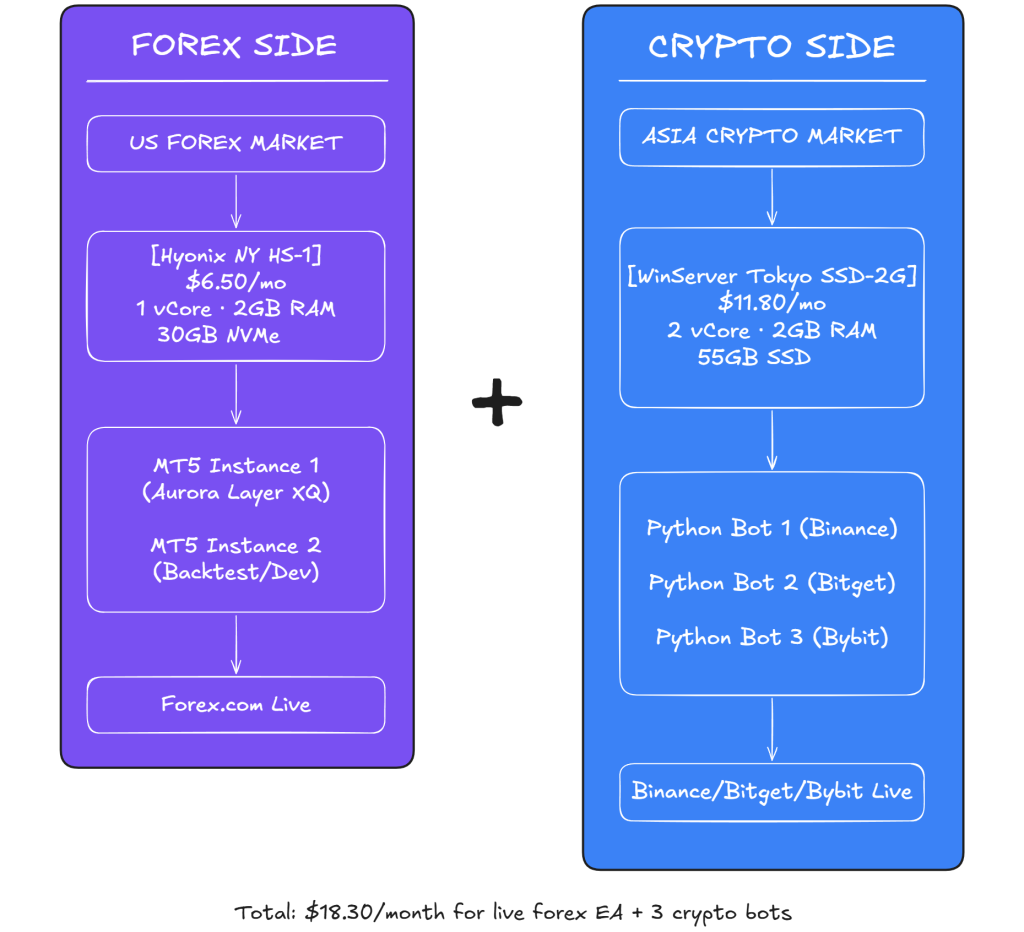
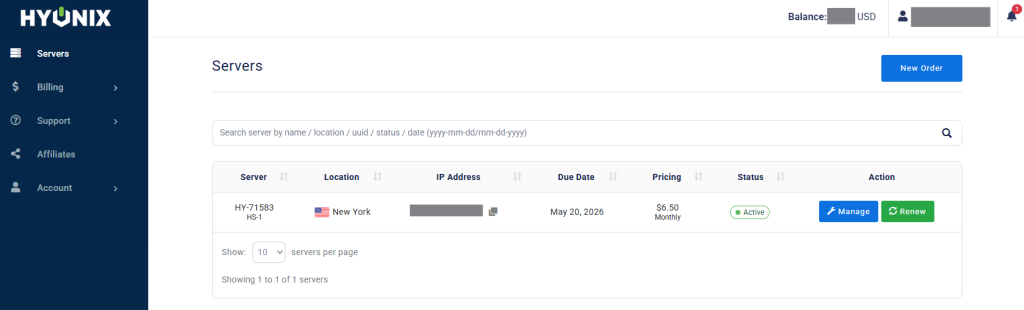
The forex machine I run today is a Hyonix HS-1 plan in their New York data center. It costs six dollars and fifty cents a month, includes one virtual core, two gigabytes of RAM, and thirty gigabytes of NVMe storage. It runs Windows Server with a dedicated IP and licensed Windows included in the price. That last detail matters because some cheaper VPS providers ship with non-licensed Windows or charge extra for the license, and you do not want to find out about it three months in.
On this machine I run two MT5 terminal instances simultaneously. The first instance runs my live Aurora Layer XQ EA on USDJPY one-hour bars connected to a Forex.com Raw Pricing account. The second instance is a development and backtest sandbox where I tune parameters and try new strategies before promoting them to the live machine. Two MT5 instances on a one-core, two-gigabyte VPS is right at the edge of what the spec can handle. It works, but it is not effortless, and there is one specific quirk worth explaining.
About three months into running this setup, Hyonix support emailed me to say that my RAM usage had climbed above their recommended threshold and that I should reboot the machine to clear it. I had been running the two MT5 instances continuously for weeks without restarts, and Windows plus the two terminals plus the broker connections had accumulated enough cached memory that the VPS was getting sluggish. The fix was simple: reboot the VPS every one to two weeks on a Saturday or Sunday when the forex market is closed. I now have this on a calendar reminder. The reboot takes about two minutes, MT5 restarts automatically because I have it set to launch on boot, and the EA picks up right where it left off because the strategy logic only acts on new closed bars and there are no open bars to lose data on during the weekend.
This is the kind of detail that no VPS provider advertises and no review article warns you about. Every VPS, regardless of price, needs some form of maintenance routine if you are running long-lived applications on it. The Hyonix support team was responsive and helpful about explaining what was happening and what to do about it, which is part of why I have stayed with them. A cheaper provider that ignores your support tickets is not actually cheaper once you factor in the time lost to figuring things out alone.
If you want to look at Hyonix yourself, this is the link I send when people ask: my Hyonix referral link. It is an affiliate link, which means if you sign up through it I earn a small commission at no extra cost to you. I would recommend Hyonix regardless because it is what I actually use, and I am writing about it because it works, not because of the commission.
Picking the Right Hyonix Plan for Your Workload
Hyonix sells nine different plans ranging from HS-1 at six and a half dollars all the way up to HS-9 at one hundred and ninety-two dollars a month.
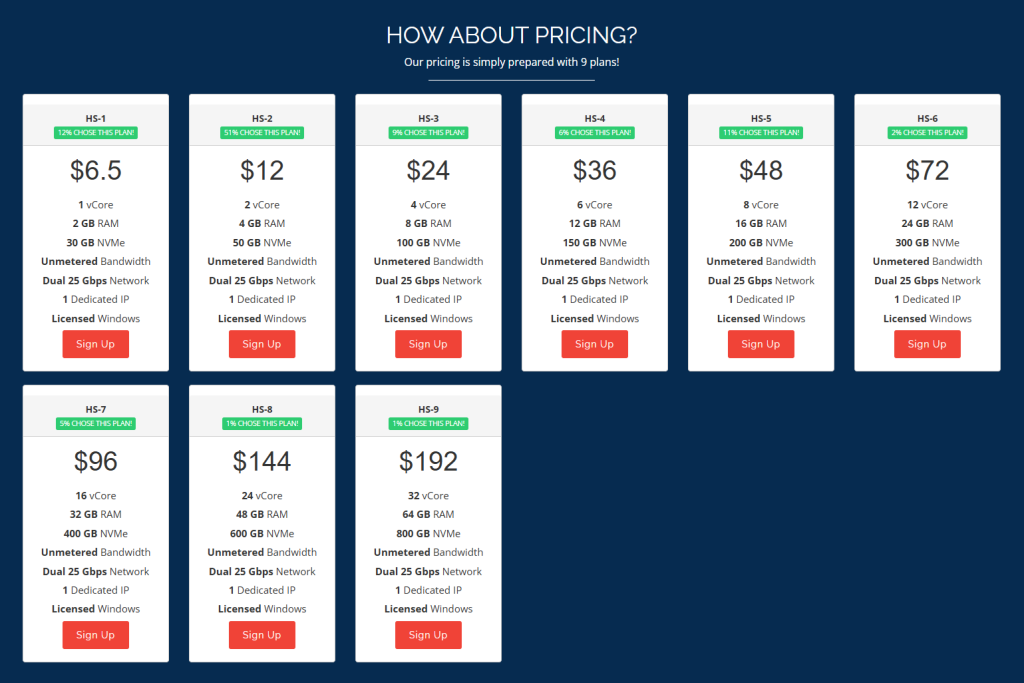
Most retail traders should never need anything above HS-2 or HS-3, and the marketing on their site does not really make this clear. Here is how I would think about the lower tier.
The HS-1 plan at $6.50 per month is what I run, and it handles two MT5 instances with EAs on each. It would also comfortably run a single Python trading bot with light pandas usage, or one MT5 instance with multiple EAs attached to different charts. If you are starting out and not sure what you need, this is the right starting point. You can upgrade later if you outgrow it.
The HS-2 plan at $12 per month doubles the cores and RAM. This is the right choice if you want to run three or four MT5 instances, or one MT5 plus a parallel Python signal generator on the same box. If you are running anything that involves real-time data ingestion to a database, like a tick recorder or a market data archiver, you want at least HS-2 because the disk write throughput matters and one core is not enough to handle the database in addition to the trading terminal.
The HS-3 plan at $24 per month is what I would consider the upper bound for retail use. Four cores and eight gigabytes of RAM is enough to run multiple MT5 terminals, a Python research environment with pandas and scikit-learn, and a small machine learning training process all at once. If you are doing serious backtest sweeps in Python while also running live strategies, this is the tier you want.
Anything from HS-4 upward gets into territory that I do not think most retail traders need. Six cores and twelve gigabytes of RAM at thirty-six dollars a month is overkill unless you are running tens of strategies simultaneously or doing serious data engineering work on the same VPS. If you find yourself reaching for HS-4 or higher, you should probably split your workload across two machines instead of paying for one big one, both because it gives you redundancy and because workload isolation prevents one runaway process from killing your trading terminal.
My honest recommendation for someone starting from scratch today: pick the HS-1 plan, run it for a month, and only upgrade if you actually hit the limits. The most common mistake I see is people over-provisioning their VPS for a workload they have not built yet, then paying for capacity they never use.
The Crypto Side: WinServer Tokyo for Three Futures Bots
The crypto side of my setup runs on a WinServer.net SSD-2G plan in their Tokyo data center. It costs eleven dollars and eighty cents a month on a six-month commitment, includes two virtual cores, two gigabytes of RAM, and fifty-five gigabytes of SSD storage. I picked Tokyo because Binance, Bitget, and Bybit all route a significant portion of their matching engine traffic through East Asian infrastructure, and the latency from Tokyo to those exchanges is dramatically lower than from anywhere in the United States or Europe.
On this machine I run three separate Python processes, each one trading a different exchange. The Binance bot runs Bitcoin futures, the Bitget bot runs Bitcoin futures, and the Bybit bot runs Bitcoin futures. The strategies are not identical across the three exchanges because the funding rate dynamics and fee structures differ enough that I want each bot to have its own parameter set. All three processes share a single SQLite database for trade logging and a common Telegram bot for notifications, so the operational footprint stays small.
I will be honest about WinServer because the whole point of this post is to share what I have actually learned rather than to sell anything. WinServer has worked well enough for the crypto bots to keep running, but there are two specific frustrations that I have been living with.
The first is unsolicited reboots. WinServer reboots my VPS on its own schedule, usually on weekends, without warning me in advance. The reboot itself only takes a couple of minutes, but it kills my Python processes mid-run. I have engineered around this by making every bot resilient to restarts, with state persisted to disk and the trade loop set to recover automatically when the machine comes back up. But the fact that I had to engineer around the provider’s behavior at all is a sign that the provider is not really designed for twenty-four-seven autonomous operation. A provider that respects your trading workload does not reboot your machine without asking.
The second is the password policy. WinServer requires periodic password resets that you cannot disable, and the reset workflow involves their support portal rather than a self-service interface. This is mildly annoying every couple of months. Not a deal-breaker, but the kind of friction that adds up over time.
For a Tokyo VPS that just runs crypto bots, this has been good enough. The bots are alive, the trades are firing, and the latency to the exchanges is what I needed it to be. But I would not call WinServer a recommendation. It is the provider I happen to be on, and the contract runs out in a few months, at which point I plan to migrate the entire crypto stack to Contabo for what I expect will be more autonomous operation. I will write a follow-up post once that migration is done.
If you are setting up a Tokyo VPS for crypto bots today, I would suggest evaluating a few alternatives before committing to a long contract. The market has gotten more competitive over the last year, and there are options that did not exist when I made this decision.
What I Learned From BestFXVPS Six Years Ago
The first VPS I ever paid for was BestFXVPS, which I used for about a year starting roughly six years ago. The price at the time was somewhere between ten and twenty dollars a month, depending on which plan I was on, and I ran three MT4 EAs on it for the duration. It worked. The machine stayed up, the EAs ran, the broker connection was stable enough that I almost never thought about it. I do not remember a single specific incident with BestFXVPS that I would consider noteworthy, which is itself the highest compliment you can pay a VPS.
The lesson from that experience, which I did not appreciate until much later, is that for a beginner running a small number of EAs the choice of VPS matters less than people make it sound. Any reputable forex VPS in the right region will probably work fine for the first year. What changes is when you start running more complex setups, or when you start caring about latency to specific brokers, or when you start running mixed workloads like I am running now. At that point the specific provider you chose six months ago becomes the bottleneck, and the value of having picked carefully shows up.
The other thing worth saying about the BestFXVPS experience is that the price-to-performance ratio of VPS hosting has improved dramatically in the years since. What cost me fifteen dollars a month then would cost me five or six dollars a month now for equivalent or better hardware. This is partly because the underlying server hardware has gotten cheaper, and partly because virtualization technology has gotten more efficient. If you are reading old VPS reviews from 2020 or earlier, the price points are not reliable anymore. The market is genuinely cheaper now.
The Maintenance Reality That Nobody Talks About
I touched on this in the Hyonix section but it deserves its own paragraph because it is the single most common gap I see in VPS reviews. Every VPS, regardless of price or provider, requires some form of ongoing maintenance if you are using it for long-running trading processes. The specifics of what that maintenance looks like differ by provider, but the existence of the maintenance is universal.
For my Hyonix setup, the maintenance is the manual reboot every one to two weeks to clear accumulated RAM. I do this on Saturday or Sunday when the forex market is closed and there is no open position to disturb. It takes two minutes including the time to verify that both MT5 instances came back up cleanly.
For my WinServer setup, the maintenance is responding to the provider’s unannounced reboots and verifying that the three crypto bots restart correctly afterward. Because crypto markets do not close, this is more disruptive, but the bots are engineered to recover and I check the Telegram alerts in the morning to confirm everything came back online.
For my old BestFXVPS setup, the maintenance was minimal because the EAs were simpler and the workload was lighter. But there were still occasional restarts and the standard Windows updates to deal with.
The general principle: when you are choosing a VPS, do not just look at the headline specs and price. Ask the provider, or look at user reviews specifically searching for the maintenance experience. How often does the provider reboot your machine without warning? How long do they take to respond to support tickets? How easy is it to get help when something goes wrong? These questions matter more than the specs once you are past the obvious filters of region and price.
The Decision Framework I Would Use Starting Today
If I were starting from scratch today and trying to figure out what VPS to use for a trading setup, here is the order I would think about it in.
The first decision when choosing a forex vps is region, and region is determined by the market you are trading. If you are trading forex, you want a VPS in New York or London, with New York being the more common choice because most retail brokers route through New York-area servers. If you are trading crypto, you want a VPS in Tokyo or Singapore, with Tokyo being more common for retail because the hosting options are deeper. If you are trading stocks or futures, the answer is almost always Chicago or New York. Do not pick a region based on where you personally live. Pick it based on where your broker or exchange is.
The second decision is workload sizing. Be honest about how many concurrent processes you are going to run, and start with the smallest plan that handles your current workload plus maybe twenty percent headroom. Do not buy for the workload you might have in a year. Buy for the workload you have now, plus a little, and upgrade when you actually hit the limits. The cost of running too small for two months and then upgrading is almost always less than the cost of running too big for a year.
The third decision is provider, and this is where most of the actual research happens. The criteria I would prioritize are, in order: support responsiveness, reboot policy, network reliability, hardware specs, and price. Most reviews lead with price, which is exactly backwards. A two-dollar-a-month savings means nothing if you lose three trades a month to provider-side reboots.
The fourth decision is contract length. For a new provider, always start with the shortest commitment available, even if the monthly rate is higher. I made the mistake of committing to six months with WinServer before I had fully evaluated their reboot behavior, and now I am living with a contract for a provider I would not have chosen if I had known. Pay the slightly higher month-to-month rate for the first thirty to sixty days, evaluate the experience, then commit if it works.
What Is Coming Next: Migrating Crypto to Contabo
The crypto side of my setup is going to change in the next few months when my WinServer contract runs out. I plan to migrate the three crypto bots to Contabo, which has a Tokyo presence and a reputation for more autonomous operation than what I have been getting. The migration itself will be straightforward because all three bots are containerized, in a manner of speaking, with their state in SQLite databases that I can copy over.
The reason I am doing this migration is not that WinServer is unusable. The bots run, the trades fire, and the money flows. The reason is that the operational friction I described, the unsolicited reboots and the password resets, adds up over months in a way that makes the whole setup feel less professional than I want it to be. A trading infrastructure should be invisible. You should not be thinking about it. When you are thinking about it, that is friction, and friction is a cost that does not show up on the monthly bill.
Once the Contabo migration is complete, I will write a follow-up post documenting the migration process, the latency comparison, and the cost differences. If you want to be notified when that post goes live, the easiest way is to subscribe through one of the masterclass links at the bottom of the page, which sends you an email whenever I publish.
The Live Aurora Layer XQ Signal Runs on This Setup
The verified live MT5 signal that I run, Aurora Layer XQ on USDJPY one-hour bars, runs on the Hyonix New York VPS described above. The full stack, from the strategy logic in MQL5 through the execution layer through the broker connection, is exactly what is documented in my Python to MT5 bridge post. The infrastructure is not separate from the strategy. They are two sides of the same operation, and the strategy would not have a verified track record if the infrastructure had been less reliable.
If you want to see what running a live MT5 EA looks like end to end, including the EA itself, the parameter sets I use, and the eighteen-chapter implementation guide that explains how all of these pieces fit together, the full bundle is documented in my Nova Quant Lab masterclass bundle. The masterclass goes much deeper than this post into the strategy logic and the specific operational practices that keep the live signal running. The EA itself is included so you can run the same system on your own broker, on your own VPS, in your own region.
The two VPS I described in this post add up to eighteen dollars and thirty cents a month for the infrastructure that runs a live forex EA and three live crypto bots simultaneously. That number used to be impossible. Today it is just careful selection. The market for trading VPS has gotten dramatically more competitive over the last few years, and the right setup for the right workload is cheaper than most people realize.
Pick the region first. Pick the smallest viable plan second. Pick the provider third based on support and reboot policy. Pay for the shortest commitment until you trust the provider. Plan for maintenance from day one. If you follow that order, you will end up with a setup that runs quietly in the background while you focus on the actual work of building strategies that make money.