

The Promise That Sold Me on Connecting Python to MT5
I started this project because I wanted to do something that sounded simple. I wanted my Python analytics to send a real signal to MetaTrader 5 and let MT5 actually place the order on my broker. Not a paper trade. Not a simulated fill. A real live trade on USDJPY one-hour bars with my own capital at risk. The reason was not academic. I had spent close to a year building an EA called Aurora Layer XQ in pure MQL5, and the strategy logic had reached the limit of what I could reasonably express inside MetaEditor. I wanted to keep the execution layer in MT5, where the broker connectivity is rock solid and the order routing is mature, but move the research and signal generation into Python, where I could run pandas, scikit-learn, and eventually heavier machine learning models without fighting the language.
The promise was clean. Python decides. MT5 executes. The Python MT5 bridge in between is just plumbing.
It turned out the plumbing was the hardest part. The first three attempts at this bridge broke in ways I did not expect, and each break taught me something specific about how MT5 actually behaves under the hood. By the time I had a version running on a live signal, the architecture looked almost nothing like what I had sketched on day one. This post documents that journey honestly, including the parts that did not work, because the failures are where the engineering lessons live.
I run my live setup on a New York VPS, the same machine I use for my Python trading bots that need twenty-four-seven uptime, and the latency numbers in this post all come from that environment.
Why Bridge Python and MT5 at All
If you are coming from the pure MQL5 world, the first question is fair: why not just keep everything in MetaEditor? MQL5 is a capable language. It has matrix operations now, it has neural network support in newer builds, and it integrates natively with the terminal. The honest answer is that MQL5 is great for execution and weak for research. Once your strategy starts to involve anything beyond classical indicators, the language becomes a tax. Backtesting a feature engineering pipeline in MQL5 is painful. Training a model in MQL5 is essentially impossible. Iterating on hypotheses in MQL5 takes ten times longer than the same work in a Jupyter notebook.
Python is the opposite. Python is fantastic for research and historically weak for execution. The trading libraries exist, but the brokers that natively support Python are mostly crypto exchanges. If you want to trade forex through a regulated broker with proper STP routing and a tier-one liquidity provider, you are almost certainly going to end up touching MetaTrader. So the python MT5 bridge is not optional for most serious forex quant work. It is the only path that lets you use the best tool for each job.
There are three common ways to connect the two, and they fail in different ways. The first is the official MetaTrader5 Python package, which is a wrapper around the terminal’s API. The second is a custom socket bridge using ZeroMQ. The third is a file-based handoff where Python writes signals to a file and an EA reads them on each new bar. I tried all three. Two of them broke in production. The one that survived is not the one I expected.
Attempt One: The Official MetaTrader5 Python Package
The first thing anyone tries is the official package from MetaQuotes. You install it with pip, you import it, you call the initialize function, and within five minutes you have Python reading live tick data from your broker. It feels like magic. You can pull historical bars, query positions, check the account balance, and even send orders. For the first two days, I was convinced this was the answer.
Then I tried to run it on my New York VPS, and the entire thing fell apart.
The MetaTrader5 Python package is not a network client. It is a wrapper around an MT5 terminal that must be installed and running on the same machine where the Python script executes. That sounds reasonable until you actually try to run it in a production environment. The terminal needs a Windows desktop session. It needs the chart open. It needs to be logged in to the broker. If the terminal disconnects from the broker for any reason, the Python package starts returning stale data or failing silently, and you have no clean way to detect the failure from inside Python. I built a wrapper that pinged the terminal every five seconds to check liveness, but even that did not catch every edge case. There were periods where the terminal said it was connected, the Python package said everything was fine, and the actual order submission still timed out at the broker layer.
The deeper problem is architectural. The MetaTrader5 Python package treats Python as the orchestrator and MT5 as a dumb execution layer. That works for backtesting and research, but it is fragile for live trading because the terminal was never designed to be controlled from outside. The EA model is what MT5 is built around. Bypassing the EA means bypassing all the resilience that the platform has accumulated over the years.
After about a week of trying to make this approach robust, I gave up on it for live execution. I still use it for pulling historical data and for offline analysis, where its limitations do not matter. But for sending real orders in real time, it is not the right tool.
Attempt Two: The ZeroMQ Bridge
The second attempt was a ZeroMQ socket bridge. The architecture is elegant on paper. You run an EA inside MT5 that opens a ZMQ socket and listens for messages. Your Python script connects to that socket and sends JSON messages containing the trade signal. The EA parses the JSON, validates it, and places the order through the standard MQL5 trade functions. Python never touches the broker directly. MT5 stays in charge of order routing, just like it always has.
This is the approach that most of the better tutorials online recommend, and for good reason. It separates concerns cleanly. Python is responsible for thinking. MT5 is responsible for trading. The bridge is a thin layer of message passing.
I built it and it worked. For a while.
The first problem showed up about a week into testing. ZeroMQ on Windows has subtle threading issues when the EA is running inside MT5. The MT5 terminal is itself a heavyweight Windows application with its own event loop, and the ZMQ context inside the EA shares process memory with the terminal. Under certain conditions, particularly when the terminal was busy redrawing charts or processing a flood of ticks, the ZMQ socket would block the EA’s OnTick handler. When OnTick blocks, the EA stops responding to new market data. In one test session, a position stayed open through a stop-loss level because the EA was hung waiting for a ZMQ response that never came. The position eventually closed at a price several pips worse than the stop.
The second problem was worse. ZeroMQ does not have built-in delivery guarantees. If your Python publisher sends a signal and the MT5 subscriber happens to be in the middle of restarting or recovering from a connection blip, the message is lost. You can layer reliability on top with the request-reply pattern, but that introduces its own complexity, and you still have to handle the case where the request succeeds but the reply gets lost. For a system that needs to be correct under all conditions, ZMQ alone is not enough. You end up rebuilding most of TCP on top of it.
I could have engineered around these issues. There are working ZMQ-based forex bots in production. But the amount of additional infrastructure required to make ZMQ truly robust under all the edge cases that MT5 throws at it started to exceed the value the bridge was providing. I needed a simpler model.
Attempt Three: The File-Based Bridge That Actually Works
The python MT5 bridge architecture I converged on, after burning two weekends on the first two attempts, is almost embarrassingly simple. Python writes signals to a JSON file. The EA reads that file on every new bar. If the file contains a signal that has not been processed yet, the EA executes the trade. If not, the EA does nothing.
That is the entire bridge. No sockets. No middleware. No threading. Just a file on disk that both processes can see.
When I first described this approach to other developers, the reaction was usually polite skepticism. File input and output for trading signals sounds primitive. It feels like something you would build as a quick prototype and then replace with a real solution. But the more I ran it in production, the more I realized that the simplicity was the entire point. The file system is the most robust inter-process communication mechanism on a modern operating system. It survives process crashes, terminal restarts, network blips, and Windows updates. The semantics are predictable. Either the file exists with the expected contents, or it does not. There is no half-state, no race condition that cannot be resolved with a few lines of locking logic, and no dependency on external libraries that might break with the next minor version bump.
The structure I use has three files. The first is the signal file, which Python writes when it wants the EA to take an action. The second is the acknowledgment file, which the EA writes when it has received and processed a signal. The third is a heartbeat file, which Python updates every minute as a liveness indicator. The EA refuses to act on any signal if the heartbeat is more than five minutes stale, which protects against the case where the Python process has died but a leftover signal file is still sitting on disk.
The signal file is a tiny JSON document. It contains the strategy identifier, the action, the symbol, the lot size, the stop loss, the take profit, and a unique signal identifier. The signal identifier is critical. When the EA processes a signal, it writes the identifier to the acknowledgment file. On the next bar, before processing anything new, the EA compares the current signal identifier against the last acknowledged one. If they match, the signal has already been processed and is ignored. This idempotency check means that even if Python somehow writes the same signal twice, or the EA reads the same file twice, the trade only fires once.
Latency on this design is around two hundred milliseconds from the moment Python decides to act to the moment the order is acknowledged by the broker. The bulk of that is the broker round trip, which is unavoidable. The actual file read on the MT5 side is under five milliseconds because both processes are on the same VPS and the file is small enough to fit comfortably in the operating system’s disk cache. For a strategy that trades off one-hour bars, this latency is completely irrelevant. Even for fifteen-minute strategies, two hundred milliseconds is well within acceptable bounds.
What the Live Signal Looks Like in Practice
The live signal I am running through this bridge right now is the Aurora Layer XQ strategy on USDJPY one-hour bars. The architecture inside the EA is a dual-strategy system. The primary strategy is a trend-following layer built on a fast and slow EMA cross filtered by a short-period RSI. The secondary strategy is a volatility breakout layer built on a Bollinger Band with a wider-than-usual deviation setting. Both strategies share the same ADX filter, which gates entries by minimum trend strength. If the ADX reading on the closed bar is below the threshold, neither strategy is allowed to take a position, regardless of what the price action looks like. This filter alone removed about thirty percent of the losing trades in backtesting, almost all of them clustered in choppy ranging conditions where neither trend nor breakout logic has any edge.
The reason this dual-strategy structure matters for the Python-MT5 split is that the strategy selection logic is the part that benefits most from being in Python. In MQL5, evaluating which of the two strategies should fire on a given bar means hard-coding the precedence in procedural code, with all the branching that implies. In Python with pandas, the entire decision is a few lines of vectorized logic that can be tested across a decade of historical data in seconds. The execution side, in contrast, is the part that benefits most from being in MQL5. Order placement, stop loss management, position sizing through the step lot mechanism, broker communication, all of this is what MetaTrader was built for. Splitting along that line plays to the strengths of both platforms.
The position sizing on the MT5 side deserves a moment of its own. The Aurora Layer XQ runs in step lot safe mode, which means the lot size grows in discrete steps as the account balance grows. The base lot is 0.03, and every two hundred and fifty dollars of realized profit above the starting balance adds another 0.02 to the trade size, up to a hard cap of five lots. The safety margin sits between the current balance and the step calculation so that the account is never sized off freshly opened equity that has not yet been realized. This design means the account compounds aggressively when the strategy is winning and shrinks back to the base lot during drawdown periods without ever overcommitting. None of this logic runs in Python. Python just sends the buy or sell signal, and the EA decides how big the position should be based on the current state of the account.
When the EA receives a signal and places the order, the resulting fill is exactly what you would expect from any MT5 EA. The broker sees a normal market order coming from a normal EA. There is no special routing, no API key juggling, no bridge software running in the path between the EA and the broker. From the broker’s perspective, this is just a customer running an EA on their Windows VPS, which is the most boring possible configuration. Boring is exactly what you want in production.
The first day I had the full system running live on USDJPY one-hour bars, I watched the Python process detect a fresh EMA cross at the end of a candle, write the buy signal into the file, and watched the EA pick up the signal at the open of the next hour and place the order without any human intervention. The system handled the transition exactly as designed. That was the moment I knew the architecture was right.
The Idempotency Problem and Why It Almost Cost Me Money
I want to spend a paragraph on idempotency because this is the part of the design that I almost got wrong, and getting it wrong would have been expensive.
In an early version of the bridge, the EA processed any signal that was newer than the last bar it had seen. The logic was: if the signal file’s timestamp is more recent than my last check, execute the signal. This seemed reasonable, but it had a subtle bug. If Python wrote a signal, the EA processed it, and then Python died and restarted without clearing the signal file, the next time the EA ran it would see the same signal sitting there with a timestamp that looked recent, and it would execute the trade again. This is a duplicate fill, and on a leveraged forex account, duplicate fills are how people blow up.
The fix was the signal identifier I mentioned earlier. Every signal Python writes gets a unique identifier, typically a UUID. The EA tracks the last identifier it has processed, persists that identifier to disk so it survives MT5 restarts, and refuses to act on a signal whose identifier matches the last processed one. This is textbook idempotency, the same pattern that any serious distributed system uses, and the same pattern I learned the hard way to use on my multi-exchange crypto bots after running into similar issues on Binance and Bybit.
The lesson is the same in both worlds. Any system where a signal can be observed more than once by the consumer needs an explicit deduplication mechanism, and the mechanism needs to be based on something Python controls, not on something the file system or the network provides incidentally. Timestamps are not unique. Signal identifiers are.
There is one more piece on the MT5 side that interacts with the idempotency story, which is the new bar filter. The EA evaluates signals only on the open of a new bar, not on every incoming tick. This is partly to prevent overfitting to intrabar noise and partly to ensure that the signal evaluation point is consistent and reproducible. Combined with the signal identifier check, this gives me two independent layers of duplicate protection. Even if a bug in Python causes the same signal to be written twice within the same hour, the EA will only evaluate the file once at the bar open, and even if the EA somehow evaluated it twice, the identifier check would catch the second attempt.
How I Handle the Failure Modes
A live trading system that does not think carefully about failure modes is not really a live trading system. It is a backtest with extra steps. The Python-MT5 bridge has three categories of failure to worry about, and each one needed its own response.
The first category is Python dies but MT5 keeps running. This is the case where my analytics process crashes, but the EA is still alive and watching the signal file. Without protection, the EA would keep executing whatever signal was last written, which might be hours stale. The protection is the heartbeat file. Python updates a timestamp in a separate file every minute. The EA refuses to act on any signal if the heartbeat is more than five minutes old. If Python dies, the heartbeat goes stale, and the EA stops trading new signals while continuing to manage existing positions through its standard stop-loss and take-profit logic. The existing positions are safe. New entries are paused until Python comes back.
The second category is MT5 dies but Python keeps running. The terminal might crash, Windows might reboot, the broker connection might drop. In this case, Python keeps writing signals to the file, but nothing is consuming them. The protection here is simpler: Python checks for the presence of the acknowledgment file and the recency of its timestamp. If acknowledgments stop arriving for more than ten minutes during market hours, Python sends an alert to my phone via a Telegram bot and stops writing new signals. There is no point generating signals that no one will execute, and continuing to write them would create a backlog that could fire all at once when MT5 reconnects.
The third category is both processes are alive but the file system has gone sideways. This is rare but it happens. A disk fills up. A permission gets changed. An antivirus tool decides the signal file looks suspicious and quarantines it. The protection is a pre-write verification check on the Python side. Before treating a signal as committed, Python writes the file, immediately reads it back, parses the JSON, and confirms the contents match what it intended to write. If the read fails or the contents do not match, Python alerts and retries. This catches almost every file system anomaly I have seen in production.
The cumulative effect of these three layers is a system that degrades gracefully rather than failing catastrophically. If Python dies, positions are managed by the EA’s stops. If MT5 dies, Python pauses and alerts. If the file system goes sideways, Python detects it before the EA does. There is no single failure that can lead to an uncontrolled state.
The Architecture Diagram
The full system, end to end, looks like this. Python sits on the VPS running the analytical layer. It pulls one-hour and four-hour bars from MT5 using the official Python package, which is fine for read-only data access. It evaluates the dual-strategy logic, applies the ADX filter, and writes the resulting signal to a JSON file on the local disk. MT5, also on the same VPS, runs the Aurora Layer XQ EA, which reads that file on every new bar. The EA validates the signal, checks the identifier against its history, applies the step lot sizing rule based on the current account balance, computes the stop loss and take profit from the current ATR, and places the order through standard MQL5 trade functions. The EA then writes an acknowledgment back to a separate file. Python reads the acknowledgment, confirms the trade was placed, and logs the result.
The flow is unidirectional in the critical path. Python writes, MT5 reads. MT5 writes the acknowledgment, Python reads it. There is no shared mutable state. There is no protocol negotiation. There is no failure mode where a message gets stuck in transit because the only transit mechanism is the disk, and the disk is either working or it is not.
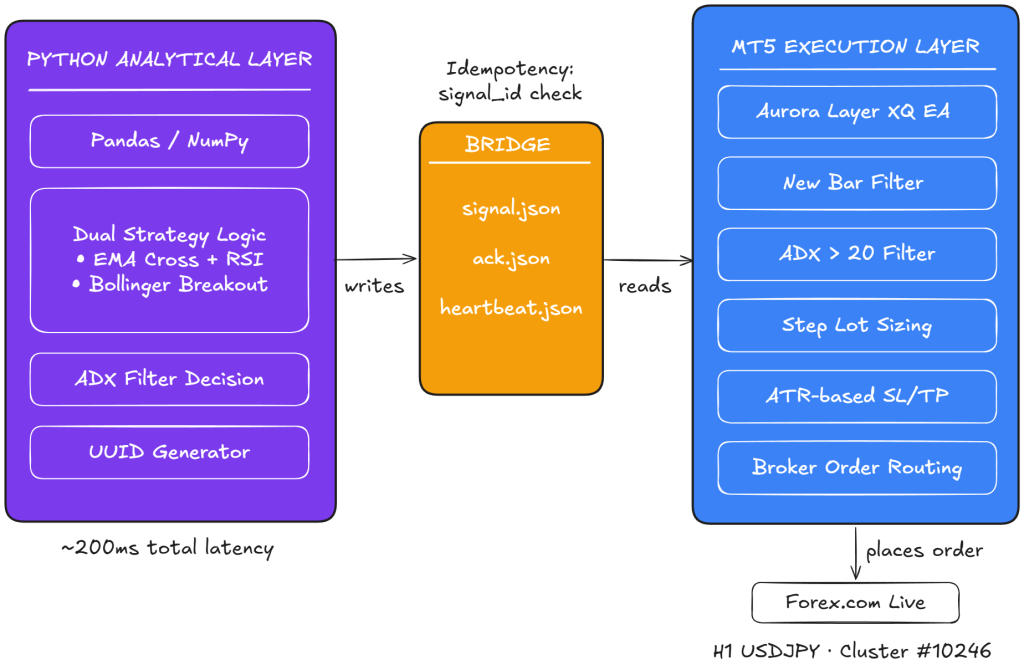
The diagram looks deliberately boring, and that is the design goal. The most reliable architecture is the one with the fewest moving parts.
What the Live Setup Actually Looks Like
The screenshot below is the actual MT5 terminal on my New York VPS, with Aurora Layer XQ running on the USDJPY one-hour chart. The EA name appears in the upper right of the chart, the active position is visible in the trade panel, and the indicator stack used for entry decisions is layered onto the price action. The system has been running on this configuration continuously, with the only manual interventions being the periodic VPS restarts that Windows imposes on everyone.
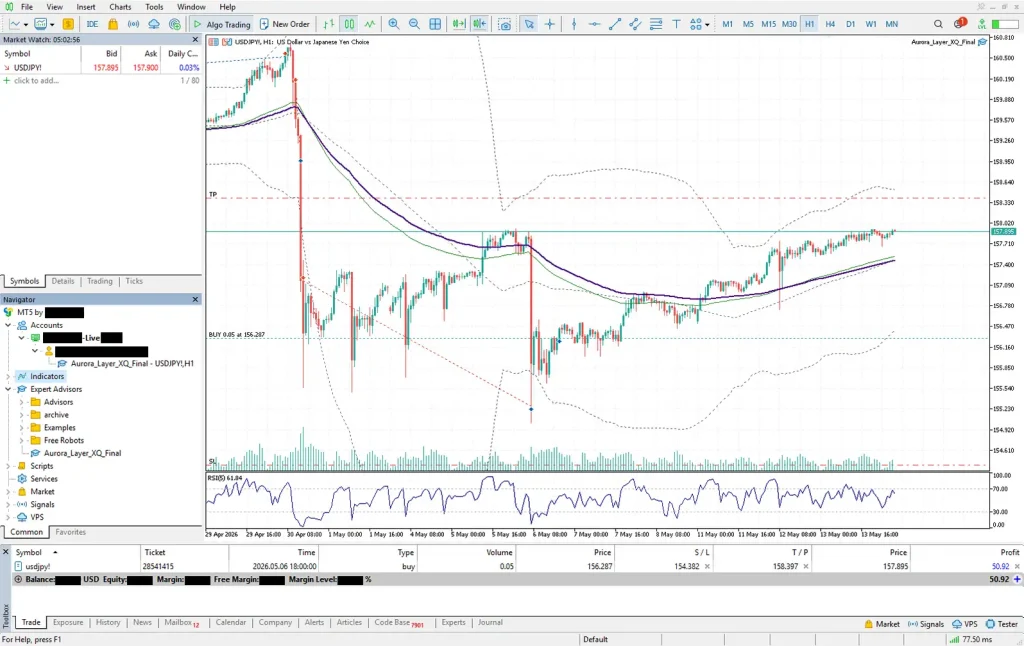
The thing worth noticing about this screenshot, beyond the obvious fact that the EA is actually running, is how unremarkable everything looks. There is no custom interface. There is no Python window visible. The trader looking at this terminal would see exactly the same thing they would see if they were running any other commercial EA from the marketplace. That is the result of the bridge design. Python is doing the thinking elsewhere, and MT5 is doing its job, and the only visible artifact of the integration is the EA itself.
What Actually Broke in the First Week of Live Trading
The system went live on USDJPY one-hour bars in mid-November. The first three days were uneventful. The signals fired when expected, the orders filled at reasonable prices, and the equity curve looked roughly like the backtest. Then, on the fourth day, the EA stopped processing signals.
The acknowledgment file had not been updated for two hours. Python was still writing signals, the heartbeat was current, but MT5 was silent. I logged into the VPS and discovered that the MT5 terminal had popped up a dialog box asking me to confirm a routine update. The terminal was waiting for a click. Until I clicked it, the EA was frozen, the order queue was building up on the Python side, and no trades were executing.
The fix was to disable automatic update prompts in the terminal configuration. The deeper lesson was that MT5 has many failure modes that look like silence rather than errors. A frozen dialog. A modal popup. A connection that has lost authentication but has not yet displayed an error. All of these can stop the EA without producing any log entry that I could detect from Python. I now monitor the MT5 process explicitly from a separate Python script that checks for the presence of any popup windows and alerts me if one appears.
The second failure was more subtle. On a Sunday night, when the forex market was closed, Python generated a signal based on Friday’s close because the trend evaluation was running on one-hour bars and Friday’s last hour was the most recent complete bar. The EA tried to execute the signal on Sunday night, but the broker rejected the order because the market was closed. The rejection arrived as an error code, the EA logged it, and the system moved on. But the signal identifier had been marked as processed even though no trade had actually occurred. When the market reopened on Sunday evening, the signal was lost.
The fix was to add an order status check to the acknowledgment. The EA no longer writes the acknowledgment file when it submits an order. It writes it only after the broker confirms the order has been filled or rejected. If the order is rejected, the acknowledgment includes the rejection reason, and Python decides whether to retry. This added about fifty milliseconds of latency to the acknowledgment loop, but it closed a class of bugs that would otherwise have caused silent signal loss.
The third issue was the most embarrassing. The first version of the bridge did not handle the case where the broker’s minimum stop level was tighter than the ATR-based stop loss the EA wanted to set. On low-volatility hours, the ATR shrinks, the calculated stop distance shrinks with it, and at some point the calculated distance falls below what the broker accepts. The order then fails with an invalid stops error. The fix was to enforce a floor on the stop distance: if the calculated distance is less than the broker’s minimum stop level, force-adjust to the minimum, plus a small safety buffer. This is now hard-coded inside the EA’s stop loss calculation, and the system has not seen an invalid stops error since.
Why This Matters for Anyone Building a Similar System
The reason I am writing this post in this much detail is that almost every tutorial I read while I was figuring this out got the architecture wrong. The articles that recommend ZeroMQ usually do not address the threading and reliability issues. The articles that recommend the official Python package usually do not mention how fragile the terminal coupling is in production. The articles that recommend file-based bridges usually do not discuss idempotency, heartbeats, or order status verification.
The result is a lot of half-built systems that work for a few weeks and then fail in expensive ways. I almost shipped one of those systems myself, and the only reason I did not is that I happened to hit the duplicate-fill bug in paper trading rather than in live trading. If I had gone live on the version of the system that did not have proper idempotency, I would have eaten a duplicate fill on USDJPY at exactly the wrong moment, and the lesson would have cost me real money instead of just embarrassment.
The general principle, which applies to any python MT5 bridge between two trading systems, is that the bridge is not the easy part. The bridge is where most of the failures will happen, because the bridge is where two systems with different assumptions about timing, state, and failure meet each other. If you treat the bridge as plumbing and design it to fail gracefully, the rest of the system becomes much simpler. If you treat the bridge as an afterthought, every other component will eventually inherit a bug from it.
What Comes Next
The current bridge has been running on a live USDJPY one-hour signal for several weeks. The verified track record is on my MQL5 signals page, and the equity curve has matched the backtest within reasonable variance. The next iteration will add multi-symbol support, which is mostly a matter of letting the signal file carry multiple symbols at once and having the EA loop over them. After that, I want to move the file storage from local disk to a small Redis instance so that the same Python process can drive multiple MT5 terminals on different VPS instances. The architecture stays the same; only the storage layer changes.
For anyone who has been hesitating to bridge Python and MT5 because they are not sure which approach to take, my honest recommendation is to start with the file-based bridge. It is the easiest to debug, the hardest to break, and the simplest to extend. The fancy approaches with sockets and middleware are appropriate for systems that need sub-millisecond latency, but for any strategy trading off bars of fifteen minutes or longer, the file bridge is more than fast enough and dramatically more reliable.
If you are running this kind of setup in production and want to see what a verified live MT5 signal looks like end to end, I run the Aurora Layer XQ EA on USDJPY one-hour bars through this exact bridge, and the full system, including the dual-strategy entry logic, the step lot money management, and the eighteen-chapter implementation guide that explains how the pieces fit together, is documented in my Nova Quant Lab masterclass bundle. The masterclass goes deeper than this post into the specific parameter sets that I use and the cluster configuration that produced the live signal, and the EA itself is included so you can run the same system on your own broker.
The bridge between Python and MT5 is one of those problems that looks small from a distance and turns out to be a serious engineering exercise up close. Building it correctly is what separates a research notebook from a live trading system. If you are doing the work, take the time to do it right. Future you will thank present you for not cutting corners on the plumbing.